Stream · 9 min read · 22 Jul 2026
Stream-Proof Destiny 2 Hack for OBS
Hide Destiny 2 ESP, utility highlighting and Aimbot overlays from OBS and capture tools with stream-proof mode.
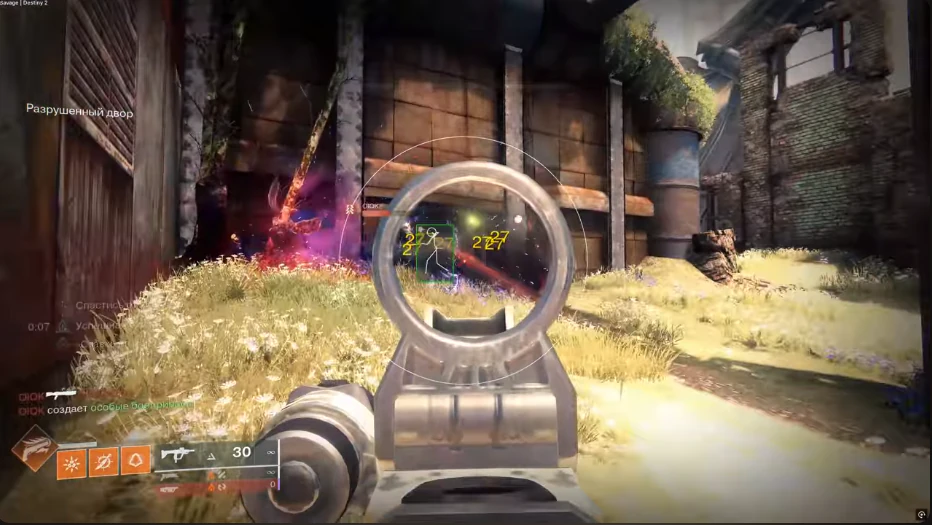
Stream-Proof Destiny 2 Hack for OBS — what it does
Stream-Proof Destiny 2 Hack for OBS keeps supported ESP, wallhack and menu overlays out of common capture paths while you still see them on your monitor.
ESP on stream is an instant report magnet. Admins and rivals watch clips. Test offline before you go live.
Stream-proof is not invisibility for blatant Aimbot on a spectator feed — play conservative even when capture looks clean.
Why stream-proof exists
Capture tools grab a different path than your eyes. Without stream-proof, boxes and skeletons can appear on the VOD while you thought only you could see them.
Private Destiny 2 lobbies and Trials cards get clipped constantly. Treat every recording as public.
OBS checklist
Enable stream-proof in the Destiny 2 Hack menu before starting OBS — not after the stream is already live.
Prefer game capture over display capture when possible. Display / monitor capture leaks overlays more often.
Record a private 20–30 second test clip, watch it back, then go live only if the VOD is clean.
Never open the cheat menu on camera even with stream-proof enabled.
Clips and report risk
Stream-proof does not hide robotic silent aim on a squad clip or admin spectator feed. Keep FOV tight and smoothing high if Aimbot stays on.
Mute neon ESP colours and shorten distance so even a leaked frame looks less obvious.
If ESP still appears in OBS, switch capture method once and retest before blaming the toggle.
Ready for Destiny 2 Hack?
Check live anti-cheat status, then buy ESP, wallhack, radar hack and silent aim for Destiny 2 on destiny2hack.org. Need help? Read Destiny 2 Hack support or player reviews. Own the game via Steam.